
The smartest way to batch rename files on macOS.
Prefix, suffix, numbering, date, regex, case change — all with live preview.
Renamify gives you a clean two-panel interface — configure your rename rule on the left, then see every filename update in real time on the right before committing a single change. Drop files or folders, choose a rule, tweak the preview, and apply. That is the entire workflow.
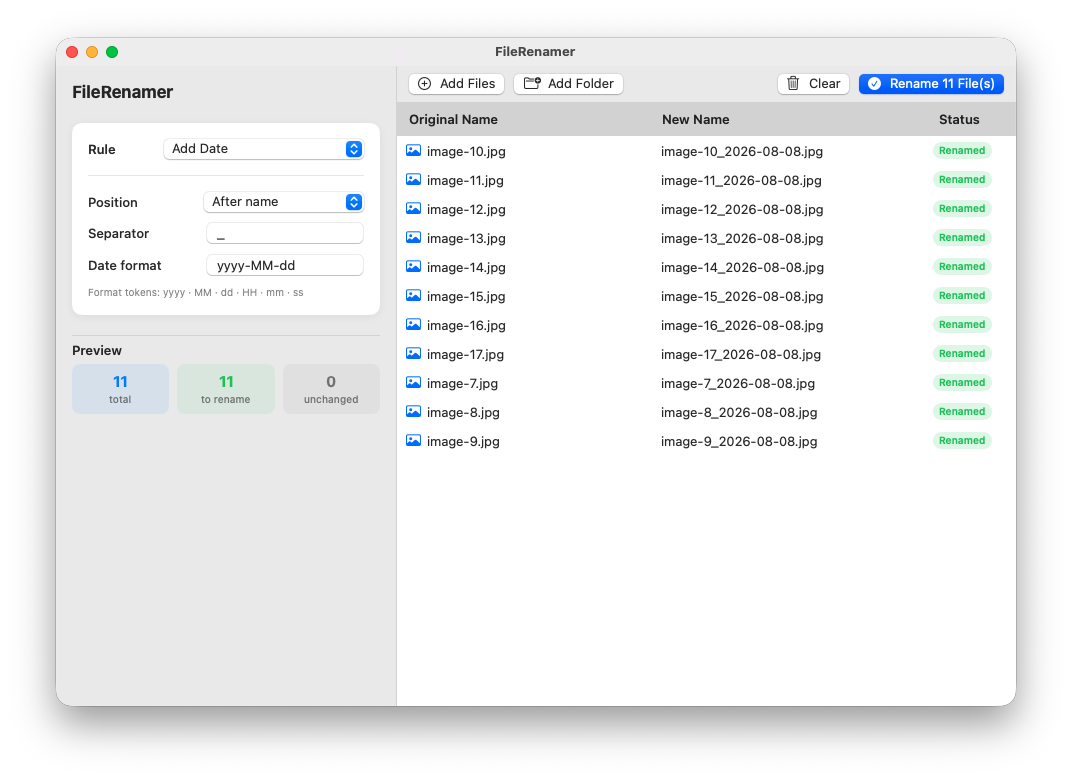
 Rule panel on the left
 Live preview on the right
 Green badge = file will be renamed
 Drag & drop files or folders
 One click to apply all changes
Powerful batch rename tools designed for macOS. No subscription, no sign-in, no internet required.

Instantly add text before or after any filename.

Plain text or full regex with case-sensitive option.

Sequential numbers with custom start, step and padding.

Insert today's date in any format you choose.

lowercase, UPPERCASE, Title Case, camelCase, snake_case, kebab-case.

Removes underscores, dashes and dots — auto Title Case.
See every new name before applying a single change.
Drop files or entire folders directly into the app.
Yes. Renamify is free to download and use with no time limits, no subscriptions, and no hidden costs.
No. Everything runs locally on your Mac. Your files never leave your computer.
Renamify requires macOS 13 Ventura or later. It is distributed as a universal binary supporting both Apple Silicon and Intel Macs.
Yes. Renamify shows a live preview of every new filename before you apply any change, so you can be confident the result is correct.
Yes. You can use plain text or regular expressions for find-and-replace, and switch between lowercase, UPPERCASE, Title Case, camelCase, snake_case, and kebab-case.